
Activate account
Here you will find information on how to activate your account before you start your postgraduate course or training.
This applies when you are enrolled in a programme at Odisee Continue, Fiscal College (FHS) or the Prevention & Environment Academy (PMA).
Step 1: Activate your account
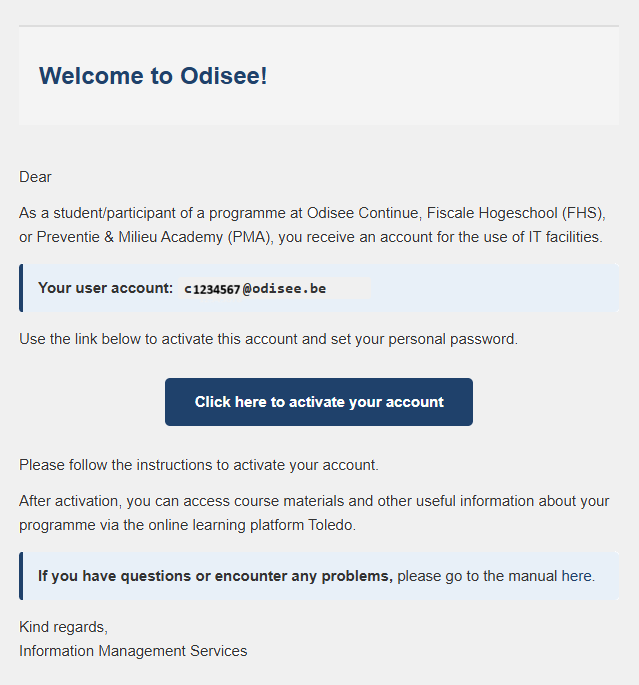
- Open the email 'Activeer je account - Activate your account' sent by [email protected]
- You will find your user name
- Click on the activation link
- Follow the instructions to set your personal pasword
- Can't find this email? Check your spam first!
Step 2: Log in to the Toledo platform
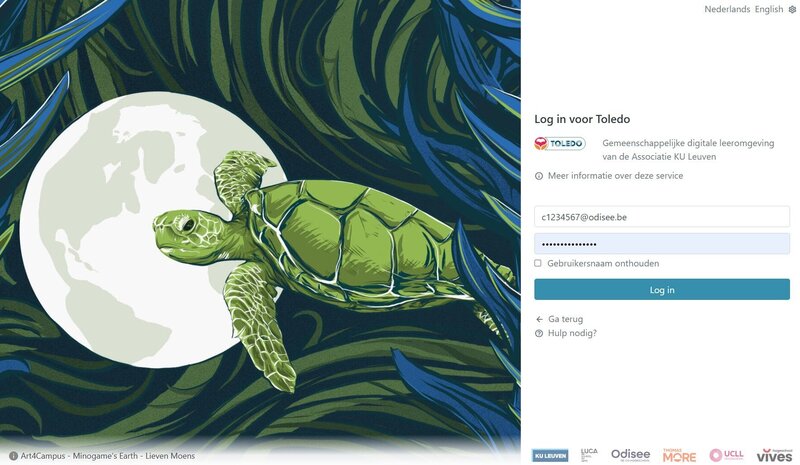
- Go to toledo.odisee.be
Choose Google Chrome or Firefox
- Choose "Log in with password"
Your username: [email protected]
Your personal password
Getting started!
Now you're all set to start your course! Start exploring Toledo right away and find out the info for your course!