Activate account
As an Odisee student, you must activate your account, which you will need to access digital services and online applications.
You will receive an email in your personal mailbox after your online registration has been processed.
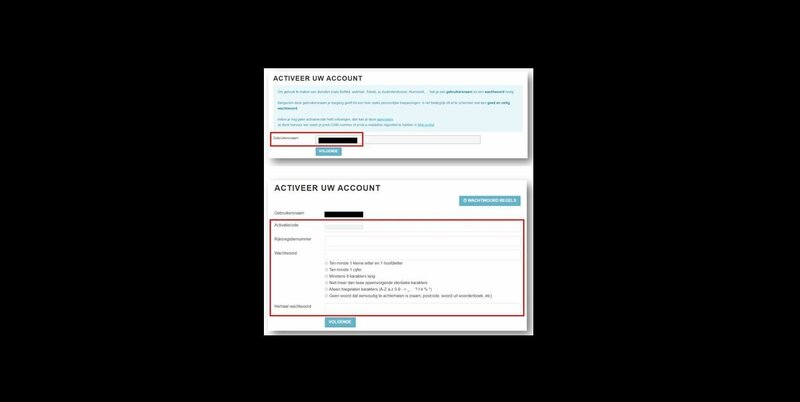
Step 1: Activate your account
- You will receive an email with the subject line “Activate KU Leuven Association account”.
- Click on the link “Activate your account here”.
- Your username (this is your student number) has already been filled in, so you can simply click on “Next”.
- Enter your national registration number and choose a password.
(If you are not a Belgian national and therefore do not have a Belgian national registration number, use your date of birth to activate your account.) - Repeat your password and click on “Next”.
After activation, you will be automatically redirected to the instructions for setting up your multi-factor authentication (MFA). You will need your smartphone for this.
Step 2: You will receive an email as soon as your account is ready
- After choosing your password and setting up multi-factor authentication (MFA) for your account, your entire account will be set up with all the necessary access rights, as well as your mailbox.
Within 24 hours, you will receive an email from us at your personal email address confirming that your account is fully ready. - If you have not received a confirmation email after 24 hours (please also check your spam folder!), please contact us using this form.
Your account is ready... what next?
- You can log in to your account using:
- your username in the form of your Odisee email address ([email protected]),
- your chosen password,
- your multi-factor authentication (MFA) if requested. To do this, you will need your smartphone with the KU Leuven Authenticator app.
- For more information, please refer to the frequently asked questions about the account and multi-factor authentication (MFA).
- You can use your account to access the following online:
- the student platform,
- your Odisee mailbox,
- your textbook orders,
- Odisee PCs (classrooms, library, etc.),
- My Admin (to request certificates, timetables, your ISP, exam schedules and results, etc.),
- The electronic learning environment Toledo